Knowledge graphs explained
What a knowledge graph is, how nodes, edges and graph traversal work, and how Headknot turns your team's documents into one.
 Sonu Nigam· FounderOct 30, 202610 min read
Your company already knows the answer to most questions. Who owns the billing service? Who is the CFO now, and who was it in March? Why did we switch databases? The answers sit in a handbook, a decision log, a board memo and a few spreadsheets. The hard part is connecting them.
A knowledge graph is one of the best tools we have for that job. This post explains what it is, how it works underneath, and how we use one inside Headknot. No maths, no jargon you have to look up.
What is a knowledge graph?
A knowledge graph is a way of storing facts as things and the connections between them.
Think of how you would explain your team to a new hire on a whiteboard. You write "Ines" in one circle and "Halden Robotics" in another. You draw a line between them and write "CEO of" on it. Then you add "Maya", "Finance", "Board memo Q2", and more lines. After ten minutes the whiteboard holds a small map of how your company fits together.
That whiteboard is a knowledge graph. A computer version does the same thing, just with thousands or millions of circles and lines, and it never runs out of whiteboard.
The key idea is simple: a fact is a connection between two things. "Ines Varga is the CEO of Halden Robotics" is not a row in a table or a sentence buried in a PDF. It is two things, Ines and Halden Robotics, joined by a labelled line.
Underneath, it is just a graph
The word "graph" here does not mean a bar chart. In computer science, a graph is a network: a set of points and the lines that join them. That is the whole definition.
You use graphs every day without calling them that:
- A metro map. Stations are points, tracks are lines. You plan a trip by following lines from station to station.
- Your contacts on LinkedIn. People are points, "connected with" is the line. "Second-degree connection" means two lines away.
- The web. Pages are points, links are lines.
A knowledge graph is built on top of this same structure. It keeps the points and lines, and adds meaning to them: each point is a real thing (a person, a company, a product), and each line says exactly how two things relate.
Why not just use a spreadsheet? Tables are great when every row has the same shape. Real knowledge does not. A person can be a CEO, an author of a memo, the lead on an incident and the manager of three people, all at once. In a table you would need a new column or a new table for each of those. In a graph you just draw another line.
Nodes and edges: the two building blocks
Every graph is made of exactly two kinds of piece.
Nodes are the things. In a knowledge graph a node is usually an entity: a person, a company, a team, a product, a document, a date, a place. Each node has a name and a type, and it can carry a few details of its own, such as a job title or an email address.
Edges are the connections between nodes. An edge always joins two nodes, and in a knowledge graph it always has a label that says what the connection means.
An edge defines three things:
- Which two nodes it joins. Ines and Halden Robotics.
- What the relationship is. "is CEO of".
- Which way it points. Ines is CEO of Halden, not the other way round. Most edges have a direction.
Read together, a node, an edge and another node form a tiny sentence: subject → relationship → object. People call this a triple.
| Subject (node) | Relationship (edge) | Object (node) |
|---|---|---|
| Ines Varga | is CEO of | Halden Robotics |
| Aiko Tanaka | leads | Hardware team |
| Hardware team | builds | Wren robot |
| Meridian Logistics | is a customer of | Halden Robotics |
That is all a knowledge graph really is: a very large pile of triples, where the same nodes show up again and again, so the triples knit together into one connected web.
Edges can carry details too. A useful one is time: "Theo Brandt is CFO of Halden" was true until 30 June 2026, and "Maya Sorensen is interim CFO" is true from 1 July. Another is source: which document said so. We come back to both below.
Graph traversal: walking from fact to fact
Traversal is a fancy word for following the lines. You start at one node, step along an edge to a neighbour, then step again, until you reach what you are looking for.
Take the question: "Who led the response to the May battery incident, and what is their role?" No single document answers it. A graph answers it in three steps:
- Start at the node May 14 incident.
- Follow the edge "led by" → you arrive at Aiko Tanaka.
- From Aiko, follow "holds role" → you arrive at Head of Hardware.
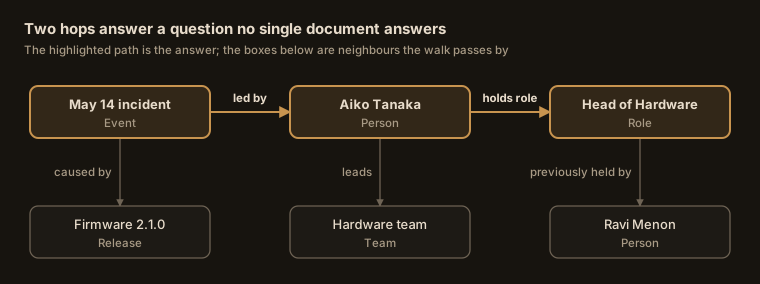
Each step is one hop. The answer is the path you walked: incident → led by → Aiko Tanaka → holds role → Head of Hardware. And because each edge remembers which document it came from, the path also tells you where to check.
There are two common ways to walk a graph:
- Breadth-first: look at every neighbour one hop away, then every neighbour two hops away, and so on. Good for "what is connected to this?" and for finding the shortest route between two things.
- Depth-first: follow one path as far as it goes, then back up and try the next. Good for chains like "who reports to whom, all the way up".
The metro-map idea holds here too. You do not read the whole map to get from one station to another. You start where you are and follow the lines. That is why graphs are fast at connected questions: the work depends on how far you walk, not on how big the whole graph is.
How a knowledge graph puts the graph to work
A plain graph only knows that two points are joined. A knowledge graph adds four things on top, and these are what make it useful for real questions.
1. Types. Every node has a kind: Person, Company, Product, Document, Event. Every edge has a kind too: works at, reports to, mentions, replaced. Types let you ask precise questions, like "show me every Person connected to this Product", without wading through everything else.
2. One node per real thing. "Katherine O'Neill", "Kit" and "K. O'Neill" are the same person. A good knowledge graph merges them into one node and keeps the other names as aliases. Ask "Who is Kit?" and you land on the right person.
3. Sources. Each edge remembers where it came from: which document, which version, which passage. A fact you cannot trace back is a rumour. A fact with a source can be checked in one click.
4. Time. Facts change. CFOs leave, prices go up, databases get replaced. A knowledge graph that records when an edge became true, and when it stopped, can answer both "Who is the CFO now?" and "Who was the CFO in March?" Without time, the newest document simply overwrites the old one, and history is lost.
Put these together and the graph stops being a drawing and becomes a memory: it knows what exists, how things connect, where each fact came from, and when it was true.
How Headknot uses a knowledge graph
Headknot turns your team's documents into a knowledge graph automatically, and keeps it current as those documents change. You bring the files; Headknot builds and maintains the map.
Documents come in from three places: files you upload (Markdown, text, CSV, JSON, HTML, Word and PDF), web pages from the built-in crawler, and connected tools such as Notion, Google Drive, Confluence, GitHub, Jira, Linear, Coda and GitBook.
From there, every document goes through three stages.
1. Extract: what does this document say? Headknot reads each document and pulls out three kinds of detail:
- Entities — the people, companies, teams, products, systems and events it mentions.
- Relations — how those entities connect ("Aiko Tanaka leads the Hardware team").
- Claims — the factual statements, such as "Q2 revenue was $2.4M", each pinned to the passage it came from.
2. Link: is this something we already know? Extraction looks at one document at a time. Linking is a separate step that compares new entities with the ones already in the graph. If the people page says Katherine O'Neill ("Kit") and a meeting note says Kit, both point to one node.
3. Keep it current: what changed? When a file is re-uploaded or edited in a connected tool, Headknot stores it as a new version. New facts are added with their date, and the facts they replace are kept as history rather than deleted.
An example: one board memo
Say you upload a Q2 board memo for a fictional company, Halden Robotics. It says that Theo Brandt has stepped down, that Maya Sorensen is interim CFO from 1 July 2026, and that revenue grew from $1.9M in Q1 to $2.4M in Q2. Here is what lands in the graph:
| Kind | What is stored | Source |
|---|---|---|
| Entity | Maya Sorensen (Person) | Board memo Q2 |
| Entity | Theo Brandt (Person) | Board memo Q2 |
| Entity | Halden Robotics (Company) | Board memo Q2 |
| Relation | Maya Sorensen → interim CFO of → Halden Robotics, from 1 Jul 2026 | Board memo Q2 |
| Relation | Theo Brandt → CFO of → Halden Robotics, ended June 2026 | Board memo Q2 + company handbook |
| Claim | Q2 2026 revenue: $2.4M, up from $1.9M in Q1 | Board memo Q2 |
Now two different questions get two different, correct answers. "Who is the CFO now?" → Maya Sorensen. "Who was the CFO in March?" → Theo Brandt. Both come with a link to the passage that says so.
Other documents add more lines to the same nodes. The decision log adds Wren telemetry → uses → TimescaleDB, with the note that it replaced Cassandra because Cassandra's running cost was three times the budget. The org update adds Aiko Tanaka → Head of Hardware, replacing Ravi Menon. The incident report adds May 14 incident → led by → Aiko Tanaka. None of these documents mentions the others, yet in the graph they are one connected picture.
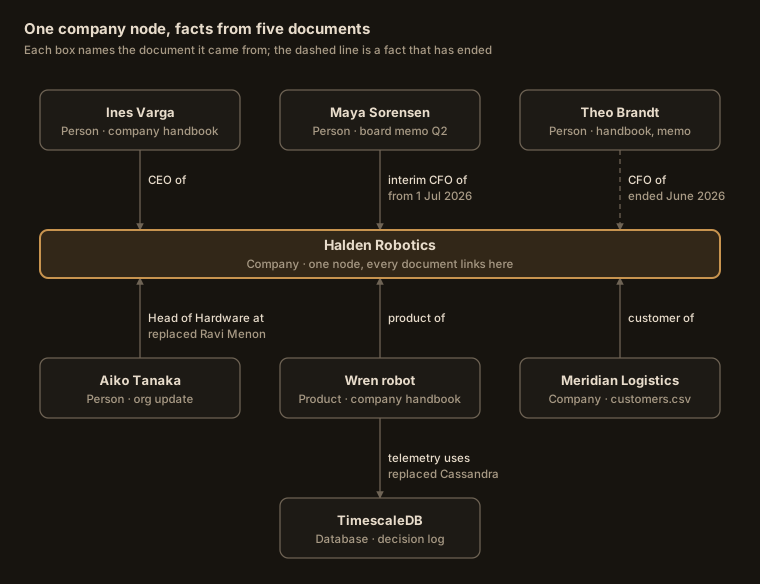
Five separate documents, one connected picture: every fact hangs off the same company node and still points back to the file that stated it.
Try it on your own documents. Creating a Headknot account is free. Upload five files your team keeps asking about — a handbook, a decision log, a people list — and ask the questions you usually answer on Slack. Create your free account →
Wrapping up
A knowledge graph is a simple idea done carefully. Things become nodes. Connections become labelled edges. Questions become short walks from one node to the next. Add types, merged names, sources and time, and you get a store of knowledge that can say not only what is true, but where it says so and since when.
The hard part has never been the graph itself. It is building it from messy, changing documents and keeping it right as they change. That is the part Headknot does for you: it reads what your team already writes, pulls out who and what is involved, links it to what it already knows, and keeps the history when facts move on.
If your team spends its week answering the same questions — who owns this, what did we decide, what changed — that knowledge already exists in your documents. It just is not connected yet.
Create your free Headknot account → Upload a handful of documents, ask a question you answered last week, and see the source behind the answer.